KumoCMS
☁️ KumoCMS
| *English | 日本語* |
Enterprise-Grade Multi-Region Serverless Content Management
KumoCMS is an open-source, high-performance headless CMS built for global scale. By leveraging AWS Serverless primitives, it provides a “zero-ops” experience with built-in multi-region resilience, perfect for document management and content delivery in high-availability environments.
✨ Key Features
- 🌍 Multi-Region Active-Active: Built-in support for DynamoDB Global Tables and S3 Cross-Region Replication for sub-second data synchronization.
- ⚡ Ultra-Low Latency: Global traffic routing via S3 Multi-Region Access Points (MRAP) and Route 53 latency-based records.
- 📦 Unlimited File Sizes: Bypasses the 10MB API Gateway limit using S3 Pre-signed URLs for direct, secure client-side uploads.
- 🛡️ Security First: Native integration with AWS WAF for rate limiting and Amazon Cognito for robust JWT-based authentication.
- 💰 Pay-as-you-go: 100% Serverless. No servers to patch, no idle costs.
🏗️ Architecture
KumoCMS runs entirely on AWS managed services:
- Frontend: React hosted on S3 + CloudFront (Optional).
- Compute: Python-based AWS Lambda + API Gateway (Regional/Edge).
- Database: DynamoDB Global Tables (NoSQL).
- Storage: Simple Storage Service (S3).
📋 Use Cases
Internal CMS
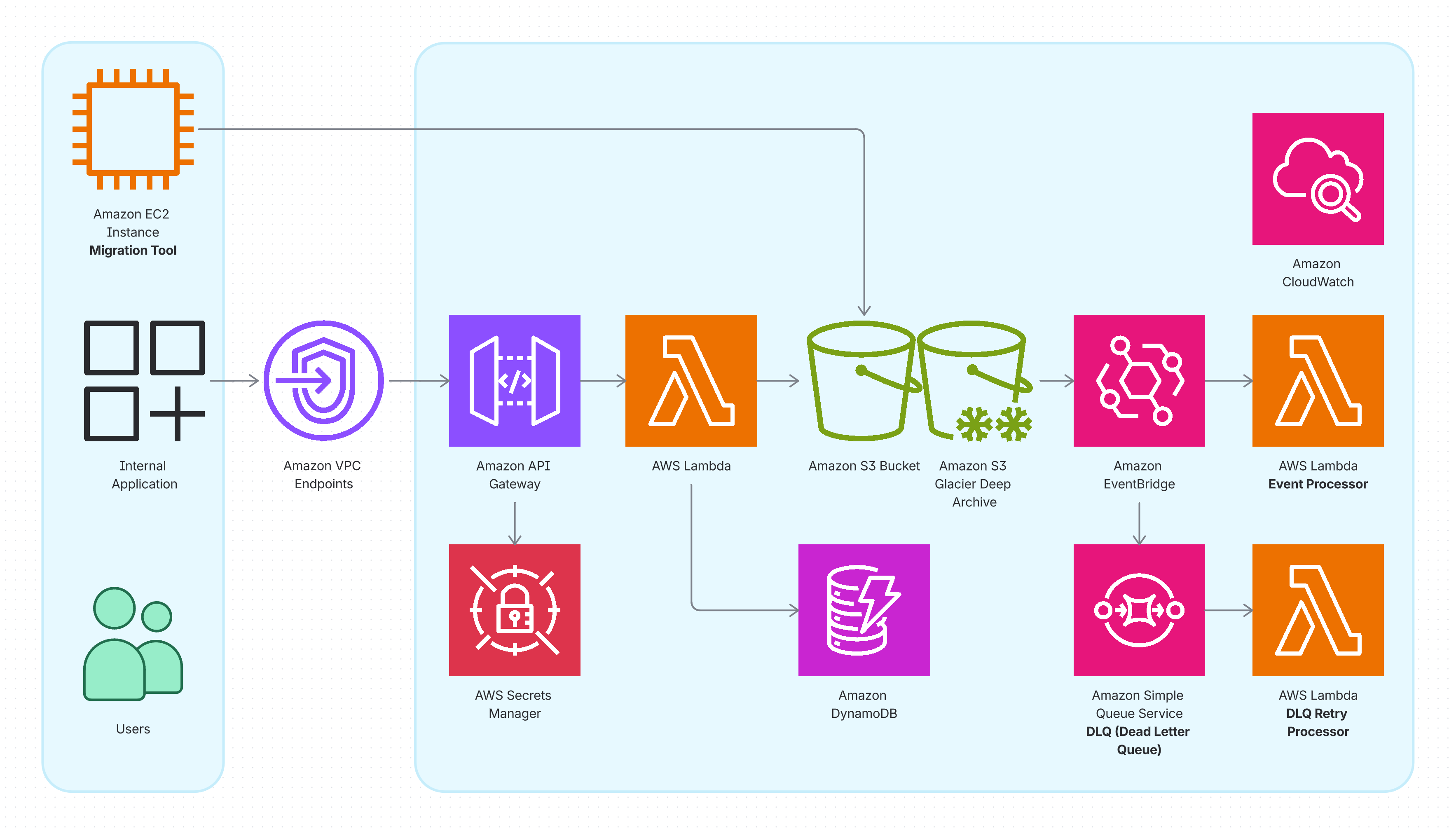
Deploy KumoCMS as a secure, internal document management system for your organization. Ideal for managing corporate documents, policies, and internal knowledge bases with controlled access.
Active-Active Multi-Region Content Management
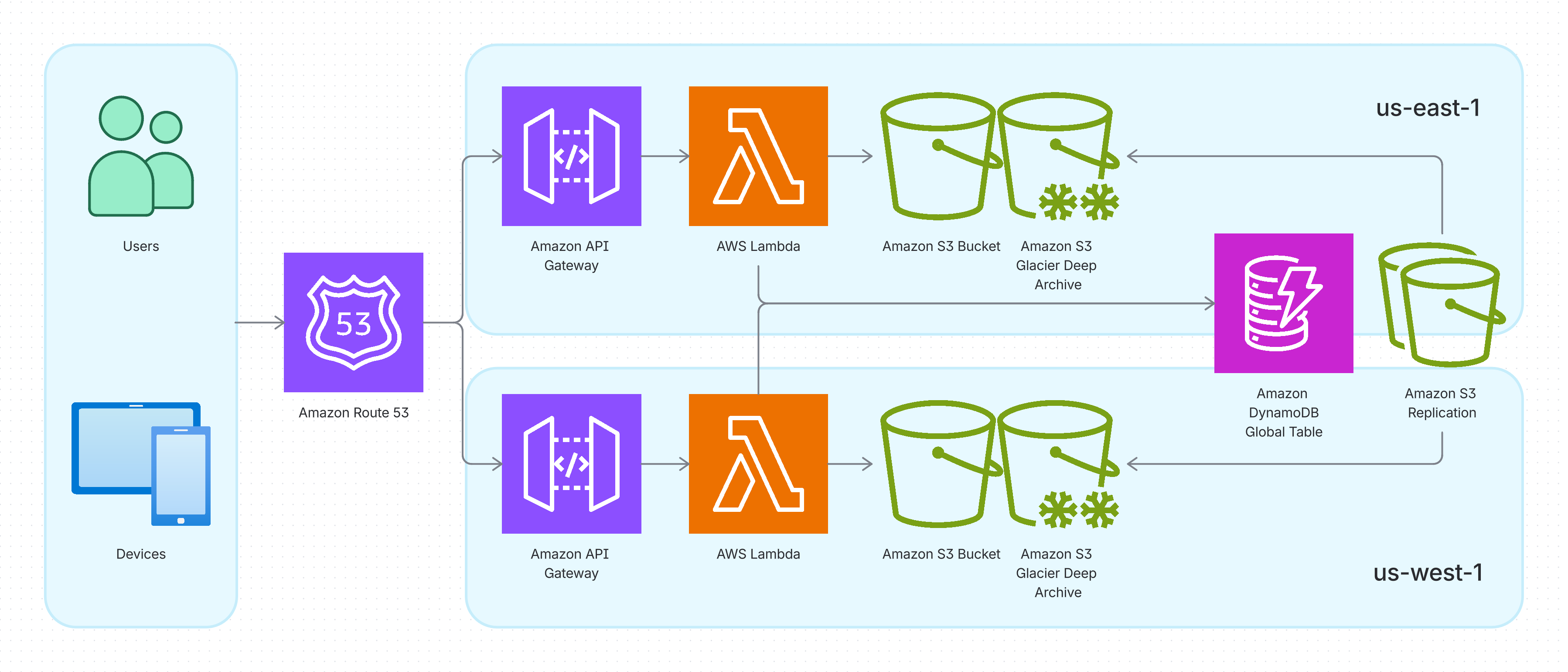
Leverage KumoCMS’s multi-region architecture for global content delivery with automatic failover. Perfect for mission-critical applications requiring high availability and disaster recovery across geographic regions.
🧩 Components
KumoCMS is built from modular, reusable components:
kumocms-lambda-python
Repository: kumocms-lambda-python
The core Python Lambda function code that powers the KumoCMS API. This repository contains all API handlers for document management operations including upload, retrieve, archive, restore, and delete.
Key Features:
- RESTful API handlers for document lifecycle management
- AWS Secrets Manager integration for API key authentication
- S3 pre-signed URL generation for direct client uploads
- Event-driven metadata extraction
- Comprehensive unit tests with mocking
| API Documentation: Swagger UI | OpenAPI Spec |
kumocms-vault-internal
Repository: kumocms-vault-internal (Private)
Complete Terraform infrastructure code for deploying KumoCMS as an internal document management system. This is a reference implementation that demonstrates how to deploy KumoCMS in a production environment.
Key Features:
- Consumes
kumocms-lambda-pythonLambda deployment package - Uses
terraform-aws-kumocms-regionalmodule for regional resources - Creates DynamoDB Global Tables for multi-region data replication
- Configures API Gateway with custom authorizer
- Sets up S3 buckets with encryption and lifecycle policies
- Manages AWS Secrets Manager for API keys
terraform-aws-kumocms-regional
Repository: terraform-aws-kumocms-regional
Reusable Terraform module for provisioning regional KumoCMS resources. This module encapsulates all the AWS resources needed in a single region.
Key Resources:
- API Gateway: RESTful API with Lambda integrations and custom authorizer
- Lambda Functions: Document handlers and event processors
- S3 Buckets: Document storage with versioning and lifecycle policies
- EventBridge Rules: Automated metadata extraction and DLQ retry logic
- SQS Queues: Dead Letter Queue for failed operations
- IAM Roles & Policies: Least-privilege access for Lambda functions
🤝 Contributing
We love contributions! Whether it’s a bug report, a new feature, or better documentation, please feel free to open an issue or submit a pull request.
For more details, please see our Contributing Guidelines.
- Fork the Project
- Create your Feature Branch (
git checkout -b feature/AmazingFeature) - Commit your Changes (
git commit -m 'Add some AmazingFeature') - Push to the Branch (
git push origin feature/AmazingFeature) - Open a Pull Request
⚖️ License
Distributed under the MIT License. See LICENSE for more information.
📺 Resources
- Setting Up Cross-Region Replication for S3 Buckets: A practical guide to configuring S3 replication rules, a core component of the KumoCMS architecture.